
JS Loops
 Asad Jakhar
Loops allow us to perform an action repeatedly. Loops can only be performed over iteratable items. Iteratable datatypes in Javascript include Array, String, Map, Set. Therefore we will call the item over which we looping as iterator.
In mathematical terms, summation and product functions are examples of loops.
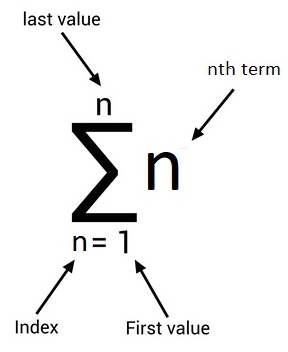
Terminologies
Interatable
In JS, it refers to items/objects that can be traversed over i.e arrays, strings, maps etc. Iteratables can be traversed over using for, for-of, while, do-while loops.
Enumerable
In JS, it refers to properties that can be traversed over i.e objects. Enumerables can be traversed over directly using for-in loop.
for Loop
It uses index based approach to iterate. There are three statements in the for loop syntax, then there is the body block in which we can write any instructions.
- First is the initialization (let i = 0)
- Second is the termination condition (i < purchases.length)
- Third is the iteration (i++)
- Lastly, body of the for loop
Example
Let's suppose we want to calculate the total of all the items in an array. For loop will allow us to iterate over indexes of the array from 0 to n-1.
Notice that last item will be n-1 because Javascript uses zero based indexing. "n" being length of the array.
Once we have the index, we can access the item present at that specific index in the array. Utilization of the value is based on whatever we want to do with it.
const orders = [{id: 1, price: 100}, {id: 2, price: 50}, {id: 3, price: 75}]
let total = 0

// generating sum of all purchases
for(let i = 0; i < purchases.length; i++){
    // body of the for loop
    const order = orders[i]
    total = total + order.price
}
Notice that the "i" is intiated with the let keyword since we are updating it on every iteration.
for of Loop
It iterates over the items in an array directly. So its more concise in syntax as compared to for loop.
const orders = [{id: 1, price: 100}, {id: 2, price: 50}, {id: 3, price: 75}]
let total = 0

// generating sum of all purchases
for(const order of orders ){
    // body of the for of loop
    total = total + order.price
}
for in Loop
It traverses over the enumerables. For example we can traverse over all the properties of an object.
const animal = {id: 1, name: 'Koko', type: 'Cat'}

for (const prop in animal){
  // print all the properties in an object
  console.log(prop)
}
We can achieve the same effect using for of loop. There are many static methods present in the Object data type, 2 of them can be used for this purpose. We can either use Object.entries(obj) or Object.keys(obj). Since these are static methods we don't have to create a new object instance, we simply pass the object instance into it. Object.entries(obj) returns a tuple (list with 2 values only), we can use the array destructor syntax from ES6 to access them. Where as, Object.keys(obj) returns the property key only. We refer to key as the name of the property.
for (const [key, value] of Oject.entries(animal)){
  console.log(key)
}
while loop
It is used to loop over based on a condition.
const orders = [{id: 1, price: 100}, {id: 2, price: 50}, {id: 3, price: 75}]
let total = 0
let i = 0

while(i < orders.length){
  total += orders[i].total
}
There is also a variant of while loop which is called a do while loop. It has the same functionality, however, in it one interation is confirmed to happen.
do{
  total += orders[i]?.total
}while(i < orders.length)
Notice that, we have added optional property syntax after the order object. Since do while loop will execute atleast once, there is a possibilty that the array is empty in a dynamic system and code can break throwing "Can't read property of undefined" error. Adding optional property syntax tells to only access this property if object is not undefined/null.