
JS Array Methods
 Asad Jakhar
A few common js methods I use during regular software developement.
map()
It is used to create a new array generated from the result of callback on each item of the existing array.
Common use cases
- Generate a new array with added/removed properties
- React specific: Get a new copy of array to avoid mutation
const serverData = [
  { name: 'Jon', id: 1, dob: '01-01-1990' },
  { name: 'Doe', id: 2, dob: '01-01-1990' },
];

const options = serverData.map((data, index) => {
  return { label: data.name, value: data.id };
});
console.log(options)
[
  { label: 'Jon', value: 1},
  { label: 'Doe', value: 2},
]
filter()
It is used to create a new array with only those items that fulfil the criteria provided in the callback.
Common use cases
- Get specific items from an array
- Remove specfic items from an array
const serverData = [
  { name: 'Jon', id: 1, active: true },
  { name: 'Doe', id: 2, active: false },
];

const filteredData = serverData.filter((user, index) => {
  return user.active === true;
});
console.log(filteredData)
[
  { name: 'Jon', id: 1, active: true },
]
find()
It returns the first item that fulfuls the criteria provided in the callback
const serverData = [
  { name: 'Jon', id: 1, active: true },
  { name: 'Doe', id: 2, active: false },
];

const foundItem = serverData.find((user, index) => {
  return user.id === 1;
});
console.log(item)
{ name: 'Jon', id: 1, active: true }
There are also variants of find such as findIndex(), findLast(), findLastIndex().
every(), some()
Every() tells us if all the items in an array fulfils the criteria provided in the callback. Some() tells us if atleast one item fulfils the criteria. These methods return boolean value.
const serverData = [
  { id: 1, price: 25, status: 'fulfilled' },
  { id: 2, price: 45, status: 'fulfilled' },
  { id: 3, price: 150, status: 'fulfilled' },
];

const allFullfilled = serverData.every((order, index) => {
  return order.status === 'fulfilled';
});
const highPriceOrder = serverData.some((order, index) => {
  return order.price > 100;
});
console.log('allFullfilled:', allFullfilled)
// allFullfilled: true

console.log('highPriceOrder:', highPriceOrder)
// highPriceOrder: true
sort(), toSorted()
Sort() is used to sort the elements in order. Note that it modifies the actual array. There is also a non-mutating method toSorted() which should be used in React apps to avoid orginal array mutation. Sort function can be quite complicated depending on the callback, there can be a few gotchas, therefore, I'll be creating a full blog post on this topic. For now, the basic functionality should suffice.
We'll be using toSorted() here because it is more appropriate for React developers. Following is a very basic example.
const items = ['Orange', 'Pear', 'Apple', 'Carrot']
const sortedData = items.sorted()
// sortedData will be ['Apple', 'Carrot', 'Orange', 'Pear']
// items will be ['Orange', 'Pear', 'Apple', 'Carrot']

const refItems = items.sort()
// items will now be ['Apple', 'Carrot', 'Orange', 'Pear']
// ref items is just a reference to the items array
JS sort works by comparing values. However only number values can be compared. So whats going on under the hood is that string and dates are converted to numbers. We know that each alphabet has a corresponding numberic character code. JS is utlizing these character codes for comparison. Date objects in Javascript will be converted to timestamp (numeric value) for comparison.
In real world scenarios, we often have to sort custom data objects. Default sort() and toSorted() don't know how to sort these objects. Fret not, there is a solution for that, both methods have a comparator argument. Comparator is a callback which allows us to sort objects.
Consider a case where we want to sort all objects by the property "name".
const serverData = [
  { id: 1, name: 'Jon Doe' },
  { id: 2, name: 'Al Pachino' },
  { id: 3, name: 'Carl Tuckerson' },
];

const comparator = (item1, item2) => {
  if (item1.name < item2.name) {
    return -1;
  } else if (item1.name > item2.name) {
    return 1;
  } else {
    return 0;
  }
};

const sortedData = serverData.toSorted(comparator);
// sortedData will be [{id: 2, name: 'Al Pachino'},
//  {id: 3, name: 'Carl Tuckerson'},
//  {id: 1, name: 'Jon Doe'}]
Note: Although the array appears sorted correctly. However, this is not a production grade comparator. It will miss case-sensitivity, case-insensitivity, mixed cases scenarios.
How does this comparator work? You can use the following mental model. If name1 < name2, it will be assigned a negative value. Score will generated by comparing each item with all the other items in the array. Once scrores are calculated, then it is simply a matter of putting the items of array in the order of scores. All this will be handled by the sorting function.
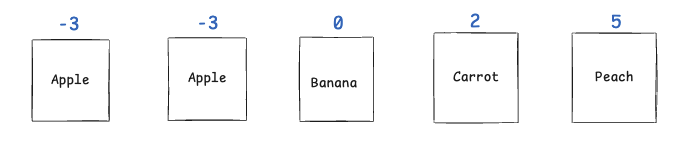
If we want to reverse the order we can simple reverse the comparater.
const comparator = (item1, item2) => {
  if (item1.name > item2.name) {
    return -1;
  } else if (item1.name < item2.name) {
    return 1;
  } else {
    return 0;
  }
};
fill()
Sometimes we need to generate data as well. The methods in this category are available to help us in this purpose. But before that I need to share an approach to generate a list with empty elements.
Generating an empty array of N items. We are essentially creating a new array, however, we are explicity calling the Array constructor. When passed a number into this constructor, it generates an array with empty elements and the number of items generated will be what be passed into the constructor.
let numberOfItems = 4;
let array = new Array(numberOfItems);
// [empty × 4]
Fill allows to change the elements in an array. The first parameter specifies the value with we want to put on the elements.
// [1, 1, 1, 1]

// Fill with 5 from index 1
console.log(array.fill(5, 1));
// [1, 5, 5, 5]

// Fill with 0 from infex 2 until index 4
console.log(array.fill(0, 2, 4));
// [1, 1, 0, 0]
reduce()
It is used to generate a single value which is calculated from elements in an array. The syntax of a reducer can be overwhelming and we can achieve the same results using a loop, so it is not necessarily a mendatory tool for a developer.
Lets suppose we want to calculate the total price of all the orders that have the status:'ok'.
const orders = [{id: 1, price: 25, status: 'ok'}, {id: 2, price: 45, status: 'ok'}, {id: 3, price: 75, status: 'fail'}]
const initialValue = 0

const profit = orders.reduce( (profit, order)=>{
if(order.status === 'ok')
  return profit + order.price
else
  return profit
}, intialValue)
// profit will be 0 + 25 + 45  = 70
NOTE: profit inside the reducer is locally scopped to the callback function so dont be confused. It won't modify the profit in the outer scope. You can change the inner profit variable name if you want.
Alternatively we can also write the same exact functionality using a for loop.
let profit = 0
for(let i = 0; i < orders.length; i++){
  const order = orders[i]
  if(order.status === 'ok')
    profit += order.price
}
// after loop execution completes, profit will be 70
includes()
It returns a boolean telling if a value exists in an array
const fruits = ["apple", "berry", "cherry"]
const isAppleFound = fruits.includes("apple") // true
join
It returns a string generated by combining all values in an array with a separator (default comma).
const grades = ["A", "B", "C", "D", "F"]
const  = fruits.join(", ") // A, B, C, D, F
push, concat
Push allows to add an item to the end of an array. However it modifies the original array. It just returns a reference to original modified array.
  const fruits = ["apple", "berry", "cherry"]
  fruits.push("peach") // ["apple", "berry", "cherry", "peach"]
Concat also allows to add item to an array but it doesn't modifies the original one. Intead it returns a new copy.
  const fruits = ["apple", "berry", "cherry"]
  const eatables = fruits.concat("potato") // ["apple", "berry", "cherry", "potato"]
slice, splice
Slice allows to get items in an array from start index to end index (not including item with the last index). Theres a bit more to slice and splice, I'll be working on a dedicated post for them.
Note: Slice returns a shallow copy of arrary. Meaning if there are objects in the array, making any modifications in the copy objects will also modify objects in orginal array.
const alphabets = ["a", "b", "c", "d", "e"]

const middleThreeAlphabets = alphabets.slice(1, 5) // ["b", "c", "d"]
const allItemsUsingFormwardIndex = alphabets.slice(0) // ["a", "b", "c", "d", "e"]
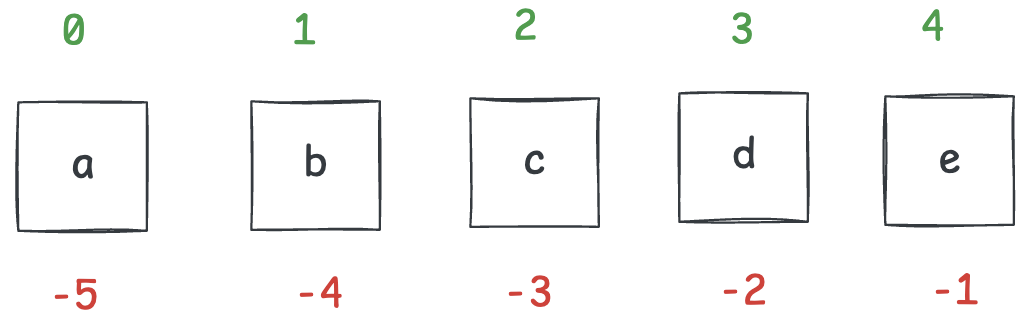
We can also use reverse indexing in slice. Attached is an image, where we can see forward indexes in green and reverse indexes in red.
const allItemsUsingReverseIndex = alphabets.slice(-5) // ["a", "b", "c", "d", "e"]
const reverseIndexAlpabets = alphabets.slice(-5, -2) // ["a", "b", "c"]
We can mix postive and negative indexes as start and end. Start index sets the direction of the iteration.
// start index sets the direction
// if it is positive, then the array is iterated in forward direction
const alphabetsUsingMixedIndex = alphabets.slice(1, -1) // ["b", "c", "d"]
// if it is negative, then the array is iterated in reverse direction
const alphabetsUsingMixedIndex2 = alphabets.slice(-1, 4) // ["b", "c", "d"]
Splice methods is used to remove items from an array. However, it can be worked around to update an array or even add items to an array.
Splice mutates the original array in all cases. It can take about 3 params. It returns a list of removed items. #1 start index #2 count of items to delete #3 items to add (dynamic param, we can keep on adding comma separated values)
Lets start with removing items from array.
  let menu = ["Tea", "Coffee", "Chocolate", "Biscuit", "Fruits"]
  // lets remove Biscuit from the menu
  let removedItems = menu.splice(3, 1)

  console.log(menu) // ["Tea", "Coffee", "Chocolate", "Fruits"]
  consoe.log(removedItems) // ["Biscuits"]
Now lets see the case of adding/replacing item. Lets replace Coffee and Chocolate with Milk and Candy
  let menu = ["Tea", "Coffee", "Chocolate", "Biscuit", "Fruits"]
  // lets remove Biscuit from the menu
  let removedItems = menu.splice(1, 2, "Milk", "Candy")

  console.log(menu) // ["Tea", "Milk", "Candy", "Fruits"]
  consoe.log(removedItems) // ["Coffee", "Chocolate"]
In case we want to add items only and not remove items. We can provide zero as second argument.
 let menu = ["Tea", "Coffee", "Chocolate", "Biscuit", "Fruits"]
 let removedItems = menu.splice(3, 0, "Strawberry")

  console.log(menu) // ["Tea", "Coffee", "Chocolate", "Strawberry", "Biscuit", "Fruits"]
  consoe.log(removedItems) // []